Recently, I’ve been playing around with OpenAI’s GPT-3 text-based engines as I found them really interesting at creating prompts or just creatively thinking of things that it could answer. But, I also wanted to be able to access it without having to always go to the website.
I looked at OpenAI’s documentation for GPT-3. Surprisingly, it’s one of the best written documentations I’ve ever seen for a beta product and is amazing at helping when you are stuck.
First, I wondered how the bot would interpret the commands.
My bot uses the phrasing “hey” as the first word to initiate a reply from the bot.
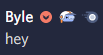
Then I would need a way to parse the rest of the text.
I’m using Discord.JS which is a NodeJS module that interacts with Discord’s API for us.
So now, we need to set up the module so that we can use it in our code.
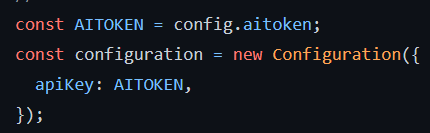

To make sure that the API token is not exposed in any way, we use a config file that is defined earlier in the code to pass it into the variable. After making the variable with the token, we pass it into a Configuration object that we use for the OpenAIApi setup.
After setting this up, we need a way to receive and parse the data.
When the bot receives the data/command, it’s received in an array of strings.
For example:
“hey I went to school” = [“hey”, “I”, “went”, “to”, “school”]
To fix this, we take the entire array and shift it so that we remove the first “hey” and only get the string array. We also send the args.join(‘ ‘) to combine the finished text and send it to the console to have a history of what’s been input.
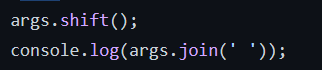
Then we can use args.join(‘ ‘) to combine the string together and send it to the OpenAI prompt.
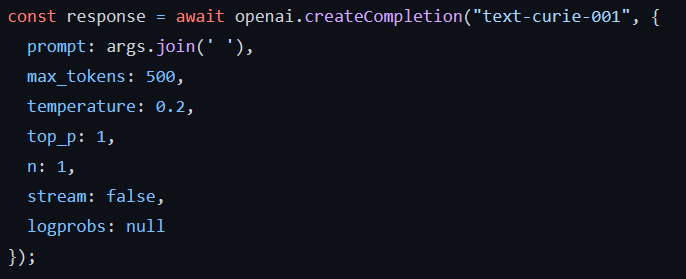
For the bot, I chose “text-curie-001”, not the best engine that OpenAI offers but one of great value for what I am doing. First, we need to call the createCompletion function of the OpenAI module that we called earlier. then we fill it with options that we want to input. For mine, we concatenate the prompt using args.join(‘ ‘). And use a maximum of 500 tokens (around 500 words) which counts the prompt and response text limit. We use a temperature of 0.2 which alters the model to take more risks the higher the value. I won’t be diving into top_p as we altered the temperature but it’s usage of nucleus sampling helps get better results. The rest are default values, but stream will wait until the response is fully done before sending the message.
Next, we need to parse the result and send it to the discord channel.
The response is made up of several parts but the part we want is the data.choices[0] array where our actual response is located.
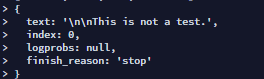
We can then take the data.choices[0] array and take the text box and put it into our response.
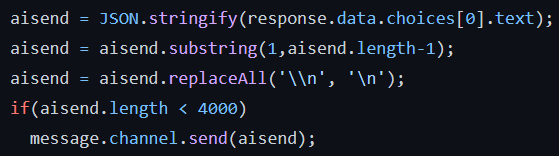
We first take our text and stringify it from a JSON format. Then usually I will take the substring of it to prevent the ” in the JSON response and replace all the line breaks to form sentences instead of lots of line breaks which can spam a channel.
Then if the result is shorter than 4000 characters (the limit of one discord message), it’ll send the message into the channel that it was asked in or if asked directly through DMs.
There you go, one of the easiest things I’ve implemented into my Discord bot so far.
If you have any questions, feel free to reach out to me 🙂